Tuesday, June 10, 2014

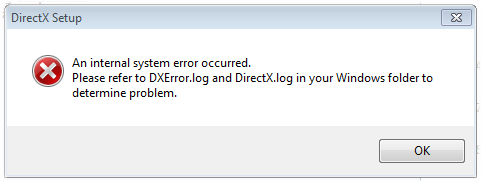
[Fix] g++.exe has stopped working.


Type Of Problem : Programs


 Problem In Text 

A problem caused the program to stop working correctly. Windows will close the program and notify you if a solution is available.


 Problem In Picture


Cause of the problem


In windows 8 “g++.exe has stopped working” dialogue is appear on dev c++ because of compatibility issue with software


Fix of this problem

[Tested 100%]

1- Open google and type “wxDev C++ download”. wxDev C++ is well compatible with windows 8. Open the first result of google.
2- Now click on full installer an download it.
3- or you can download it direct from here .
4- now install it on your computer.
5- After installing open the program and check it.

if your problem not fixed , you can leave comment for us and we will take care of that .

Thank You !


Monday, June 9, 2014

[Fix] The application was unable to start correctly (0xc000007b). Click OK to close the application.


Type Of Problem : Games

 Problem In Text 


[Fix] The application was unable to start correctly (0xc000007b). Click OK to close the application.

 Problem In Picture


Cause of the problem


Error 0xc000007b is a problem which appear when you are going to open some application on windows. Actually this error indicates to an invalid image format. However, why this is happening and what the error code usually means ? Actually this could be appear when you are trying to run a program that is made for or intended to work with a 64 bit Windows operating system, but your computer is running on 32 bit Operating system. There are a couple of other few reasons why this might be happening as well, particularly if you know you have a 64 bit operating system, or have been able to run the program in the past. There are several reasons to occur this problem in your Windows. Here are few reason why your PC shows 0xc000007b error and some troubleshooting steps.

Like : WATCH DOGS


Fix of this problem

[Tested 50%] 

Uninstall it, delete all the folders it added manually afterwards if it left anything behind, re-install it. Make sure your computer meets the requirements to run the game.


[Tested 100%]

1- First of all i strongly recommended you that use compatibility bit of application, what bit of OS is running in your inside the PC. This will help to run application properly.

2- re-install Microsoft Visual C++.

3- Sometimes to run properly some applications require restart after installation, so Restart your Computer.

4-  upgrade your .NET Framework to avoid causing issues.

5- In some cases application application data files could be corrupt or missing, this missing data causes problem in your application so simply re-install your application.

6- some application need to run as an administrator. This process could fix the error on application. To do this things Right click on the program, then click on Properties, and on the Compatibility tab. Check the Run this program as an administrator box, and click on OK. Now you are able to run your application as an administration.
 
if your problem not fixed , you can leave comment for us and we will take care of that .

Thank You !


Wednesday, June 4, 2014

[Fix] an error occurred while decompressing: archive header is corrupt!


Type Of Problem : Games

 Problem In Text 


an error occurred while decompressing: archive header is corrupt!
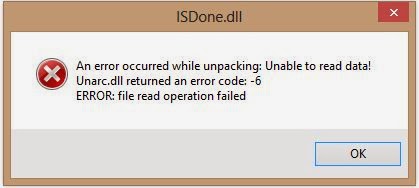
Unarc.dll returned an error code: -14
ERROR: This is not FreeArc archive or this archive corrupt

 Problem In Picture


Cause of the problem


The reason for this problem is the lack of software that came from Black Box, which has pressure of the game, when the window appears this means that he can not installing the game, but when the installation files that you selected in the box and the installation files does not exist.

Like : WATCH DOGS
 

Fix of this problem

[Tested 100%] 


During the solution of the problem is the appearance of the screen to choose the software that is installed during the installation of the game, you have to remove the sign and follow their health inauguration game manually.

if your problem not fixed , you can leave comment for us and we will take care of that .

Thank You !


Thursday, May 29, 2014

[Fix] Internet Download Manager has been registered with a fake Serial


Type Of Problem : Programs


 Problem In Text 

Internet Download Manager has been registered with a fake Serial


 Problem In Picture


http://4.bp.blogspot.com/-IiYLYmnAlqU/TgcLNL6_siI/AAAAAAAAAGw/1CLNM1EzdBA/s1600/fake+serial+idm+exiting.jpg


https://blogger.googleusercontent.com/img/b/R29vZ2xl/AVvXsEjCrd-6yAlfKQFBUx1zCn3CE7dG79bySDE5jE7QD7M0LBcIxmpBuESL9NDMMPyJA4siy_tacs-MmaXnlm6qn6Lc9KegyGlgkmqRgSdh0_hm4yPcbMGIyE-Y_4qO6vSh31uoQ_HjTS3lkU_C/s1600/IDM-fix_2.jpg


Cause of the problem


 Cause of the problem is that you are using the key to the program forged or corrupted or has been reported and by the company and should be replaced.


Fix of this problem

[Tested 100%]

You have to buy the full version of internet download manager

You can buy the IDM by Clicking here

[Tested 90%]

You have to download this tool and follow the install steps :

1 - Click here to download it.
2- Copy it on the IDM File Location ( C:\Program Files (x86)\Internet Download Manager\
3- Run the tool after copy it as Administrator.
4- Be Sure that u close the IDM .
5- Copy the Generate Code from the tool.
6- Click Patch ,  and chose IDMan.exe.
7- Run the IDM and go from menu bar to reregistration and chose reregistration 
8- Paste the Generate code on Serial Number.

http://www.internetdownloadmanager.com/register/new_faq/pictures/copy-paste-sn2.png


if your problem not fixed , you can leave comment for us and we will take care of that .
Thank You !


Wednesday, March 12, 2014

[Fix] Google Chrome has crashed. Restart Now?


Type Of Problem : Programs


 Problem In Text 

Whoa! Google Chrome has crashed. Restart Now


 Problem In Picture


Cause of the problem


 This is because of the Internet Download Manger 6.05 build 6 or less .


Fix of this problem

[Tested 100%]

You have to download the latest version of internet download manager

You can download the IDM by Clicking here


if your problem not fixed , you can leave comment for us and we will take care of that .

Thank You !